Showcase

The software layer on top of the lighting.

Beam is the platform we build in-house for Helvar sites. BeamUI commissions them from a browser, BeamWatch watches every router around the clock, and BeamEdge is the small box on site that runs it all and hands the building management system clean lighting data.

On site

BeamEdge: the box on the lighting network.

BeamEdge

A site unit for Helvar lighting control

A compact Linux unit, the same hardware class as our Remote Commissioning Unit, that sits on the lighting network and runs BeamWatch. It monitors every router around the clock, keeps the history on site, serves the BMS over BACnet/IP and MQTT, and gives our engineers a secure link for support. It works fully offline.
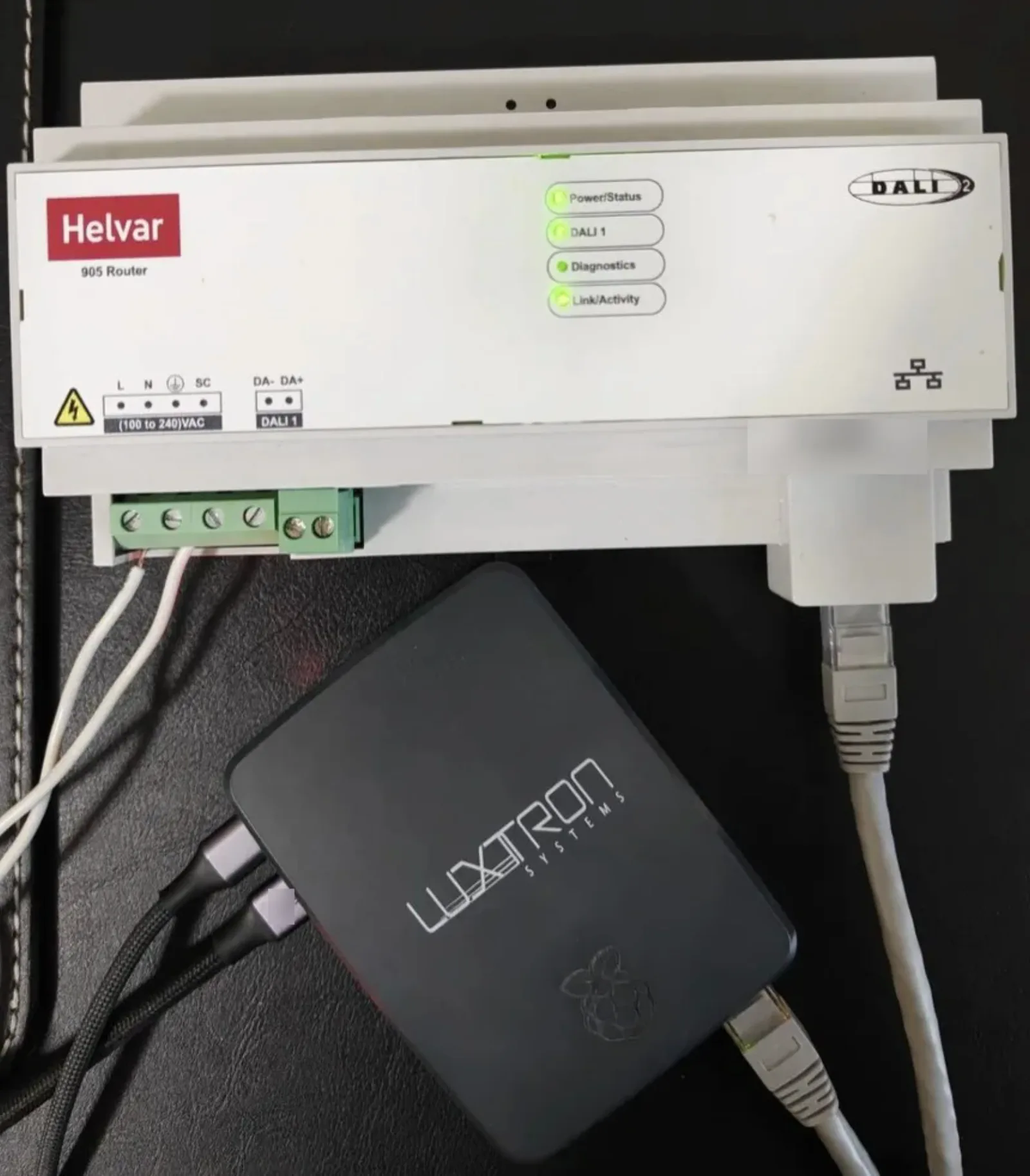
BeamEdge, photo 1
How BeamEdge connects the Helvar system to the building

Reads

  • Helvar 905 / 910 / 920 routers
  • DALI devices, groups and scenes
  • Sensors and keypads

BeamEdge

  • Monitoring
  • History and analytics
  • BMS points
  • AI assistant

Serves

  • BMS over BACnet/IP and MQTT
  • Facility dashboards and SAMA panels
  • Weekly site health reports
  • Your own AI tools, over MCP
Commissioning

BeamUI: Helvar from a browser.

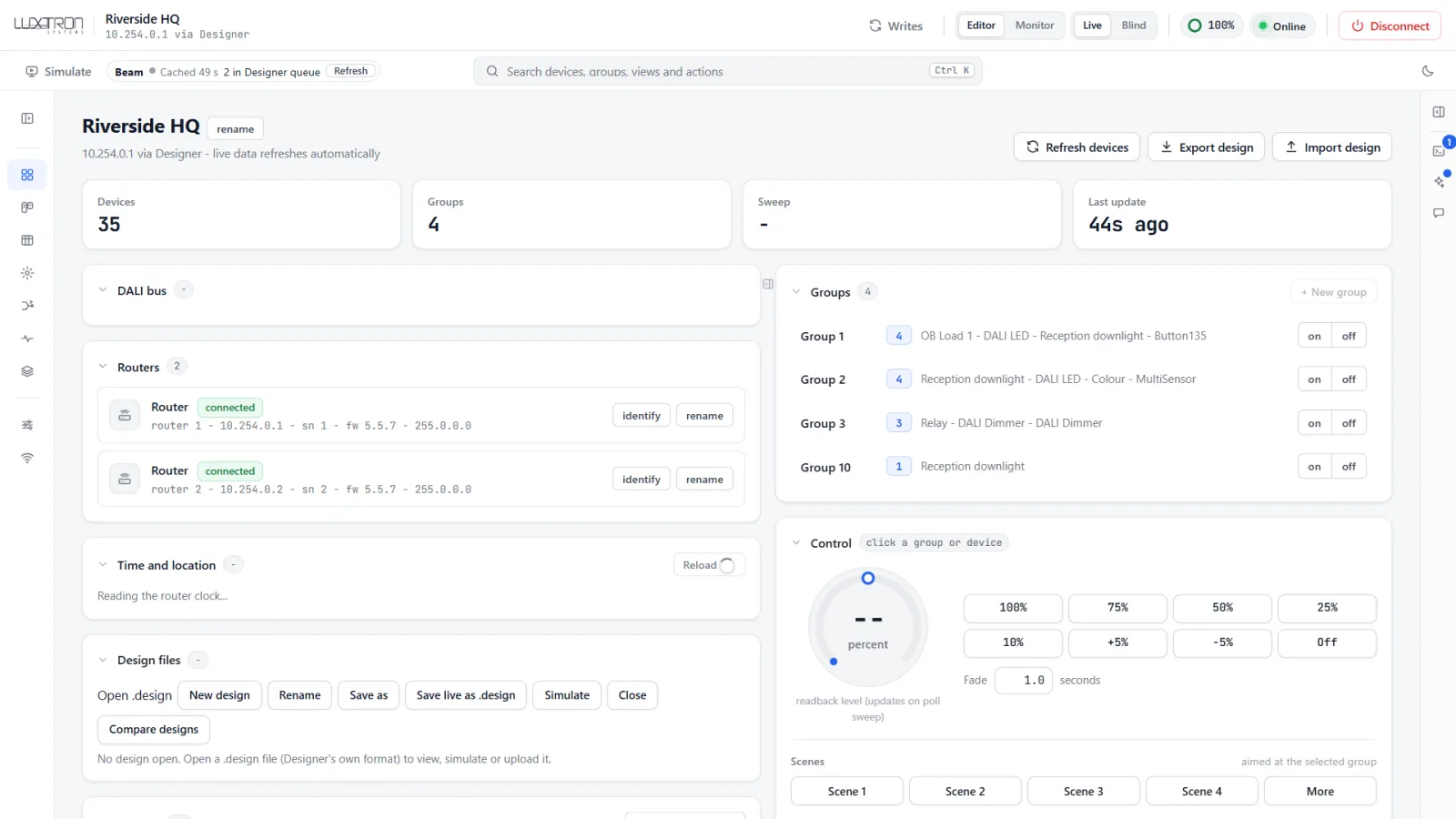
BeamUI is how we commission Helvar systems: group, name, configure and identify devices from a browser on a laptop, tablet or phone, instead of from one desktop on a cable. It works with your own Helvar Designer installation, so the design file stays the source of truth.

  1. Commission from any device

    Walk the site with a phone, identify a fitting, name it and drop it into its group on the spot. The engineer on the ladder and the one at the desk see the same live view.

  2. Live view of the system

    Routers, subnets, devices, groups and scenes in one page, with levels and faults as they are now, not as they were drawn.

  3. Changes you can check

    Every change is written, read back and logged, so you know what the site holds rather than what someone meant to send.

  4. Offline design work

    Open a Helvar design file without a router attached and prepare the job before anyone is on site.

BeamUI site overview: routers, groups, live control and device counts
The whole site on one page.
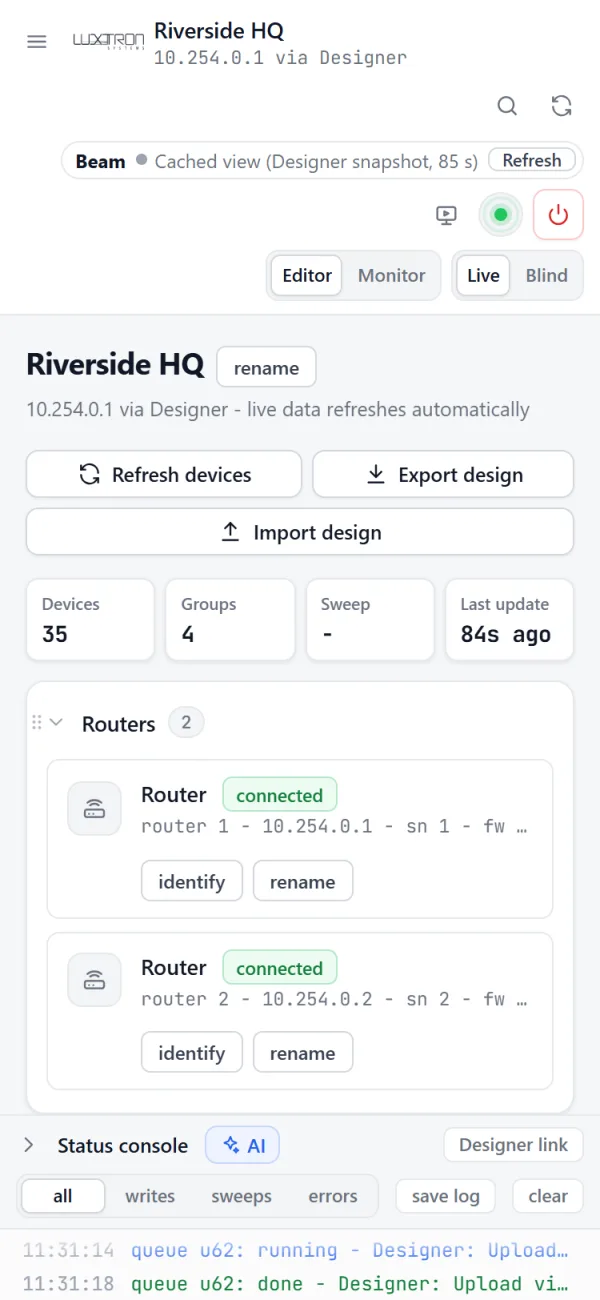
BeamUI on a phone, showing the site and its routers
Same site, on a phone.
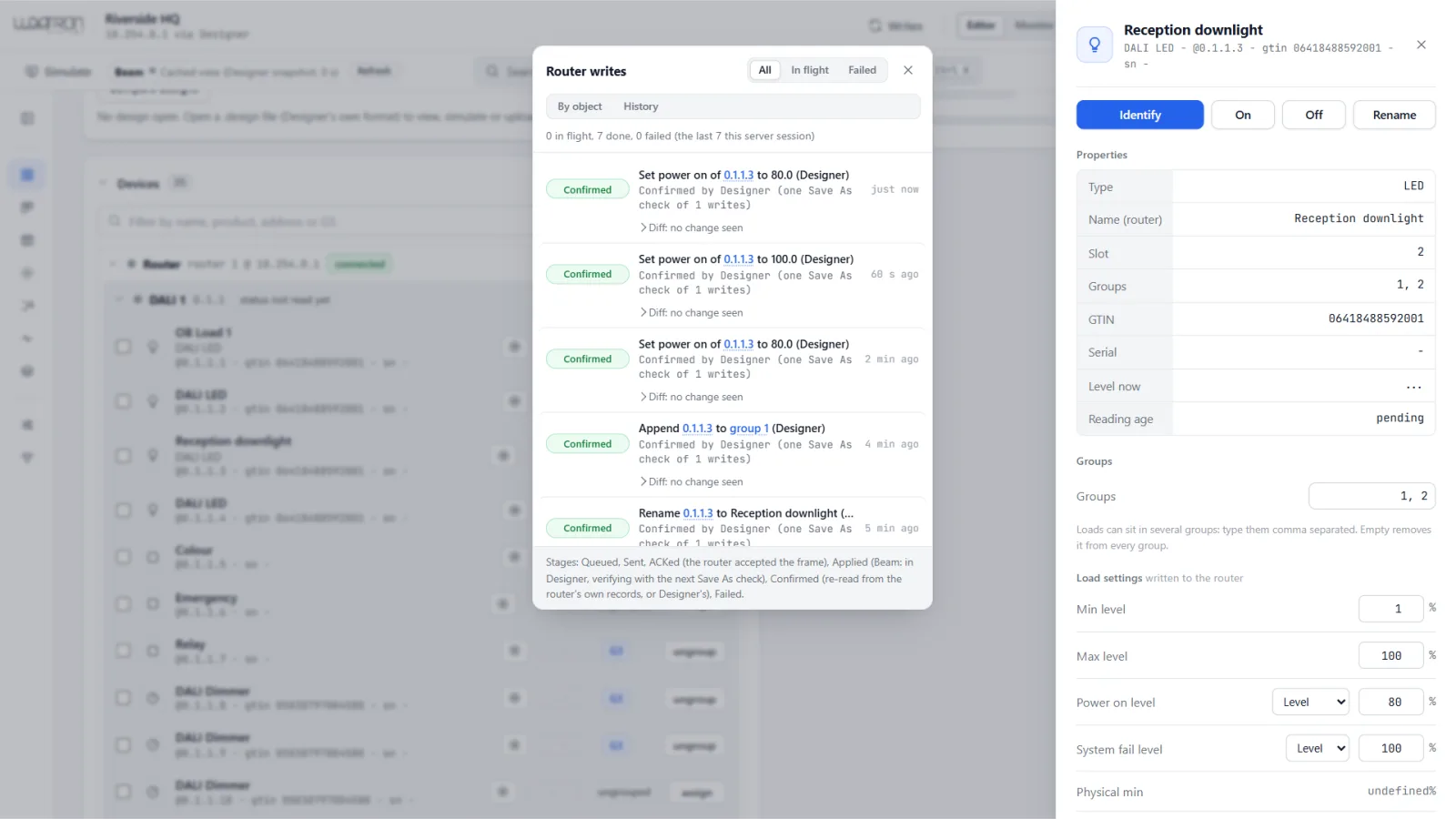
BeamUI writes tray with each change marked confirmed
Every change tracked until the router confirms it.
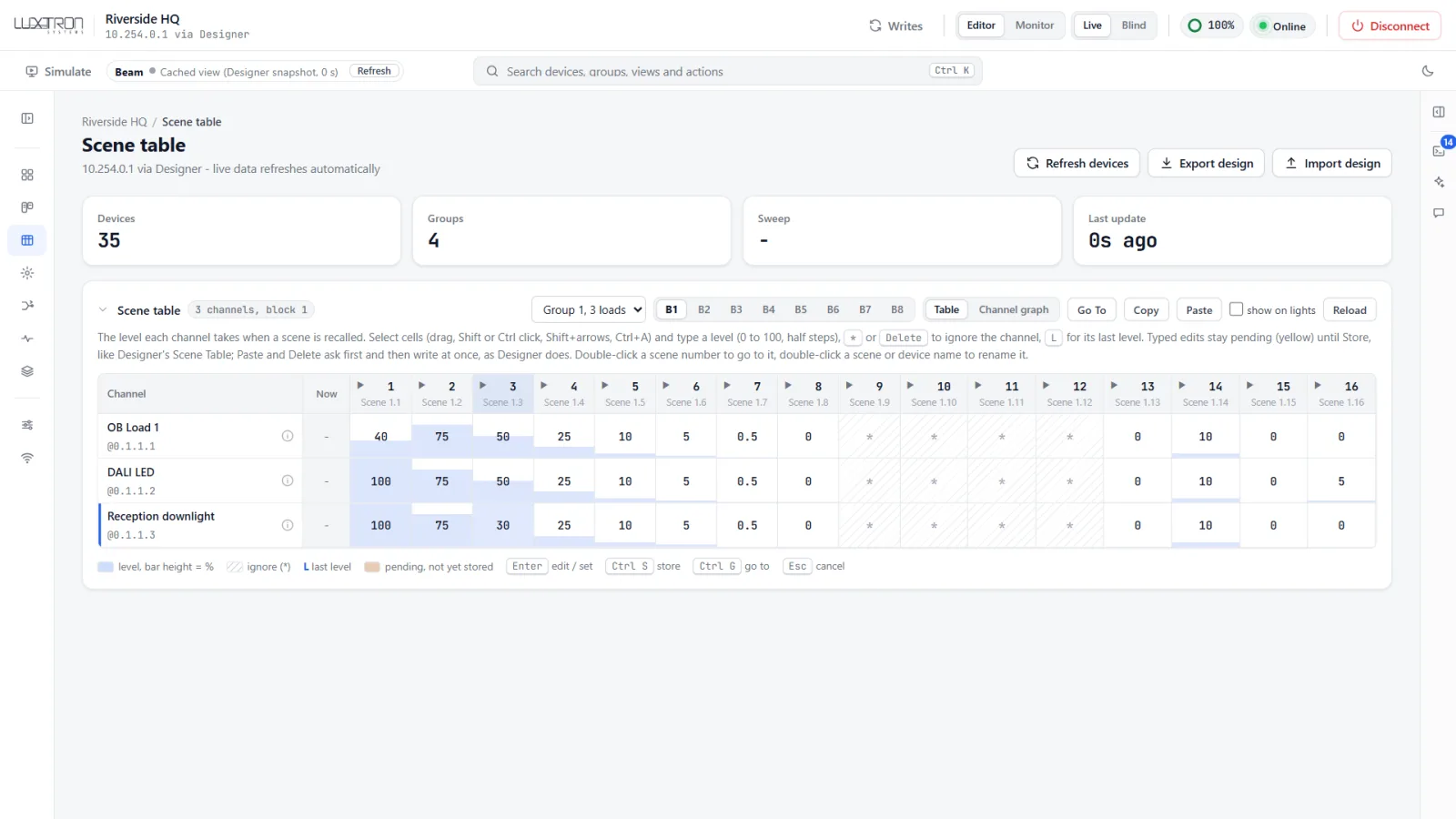
BeamUI scene table for a group
Scene tables, edited in place.
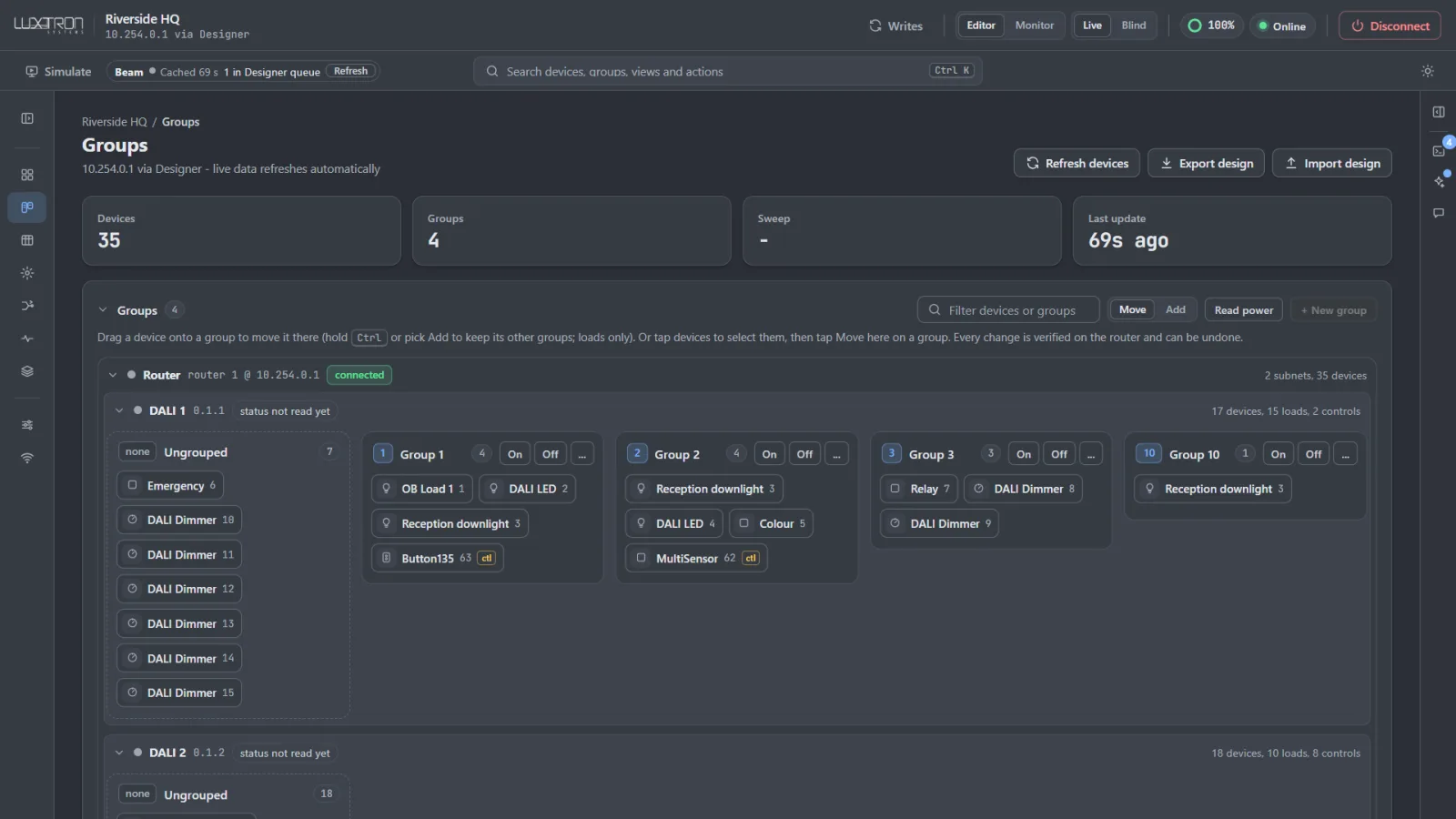
BeamUI groups view in the dark theme
Light and dark themes.

BeamUI is available to commissioners with a licensed Helvar Designer. Remote commissioning is provided by Luxtron.

Monitoring

BeamWatch: every router, around the clock.

BeamWatch is the always-on part of Beam. It reads the routers through Helvar’s published integration protocol, only ever asks questions and never sends a command, so it can run on a live building from day one.

  1. Live status per subnet

    Every router, subnet and device, with a status timeline. Lamp failures, missing devices and comms faults show up as events with a time stamp, not as a surprise during a walkround.

  2. Usage and energy

    Hours and levels per device and group, and an energy figure per area. Helvar routers do not report measured power per fitting, so we label the energy figure as an estimate and show how it is worked out.

  3. Failure history

    Every fault is kept, so you can see which driver types and which floors fail most, and how long fittings run between failures.

  4. Anomalies

    Lights on overnight, areas lit out of hours, rooms that are never used, devices that keep dropping off the bus. The things that waste energy or hint at a wiring fault.

  5. Weekly site health report

    A short report every week for the facility team, with an optional plain-language summary written by AI from the same data.

  6. Your data stays on site

    History is stored on the unit itself, more than a year of it by default, in plain files you can open. Nothing needs the cloud.

BMS

Lighting points your BMS can trust.

Most BMS integrations stop at a hand-typed points list. Beam builds the lighting points from the commissioning data itself, so names and rooms in the BMS match the site.

  1. BACnet/IP and MQTT today

    Group levels, last scene, device status, subnet status and estimated energy, published as BACnet objects and MQTT topics. Read-only, so the BMS can watch the lighting without being able to break it.

  2. Guarded control next

    Scene recall, group levels and off from the BMS, through an allow-list you approve point by point, with a login and an audit log of every command.

  3. Modbus TCP next

    For SCADA systems and older BMS front ends that only speak Modbus.

  4. Points lists drafted for you

    Planned: AI proposes object names and tags from the room and device data, or maps an existing BMS points list onto the site. A person checks the table before anything goes live.

AI

AI that drafts. People decide.

AI in Beam drafts, it does not decide. Every change it suggests is shown as a plan with a before and after, and only runs once a person approves the whole plan. Each step is checked against the router afterwards and logged.

  1. Commissioning assistant

    Next, in BeamUI: turns a brief in plain language into grouping, naming and scene changes, shows the result as a before and after, then applies it in one approved step.

  2. Fault explainer

    Next: reads the diagnostics and suggests the likely cause and the next check: one missing driver, a whole line down, an address clash, a power supply near its limit.

  3. Handover in plain language

    Planned: a handover pack with the device schedule, scenes per room and a written sequence of operations, where every sentence points back to the setting it describes.

  4. Questions from the facility team

    Planned: “why is meeting room 4 on at night?” answered from the schedules and the event history, with control limited to the areas and actions a role is allowed.

The AI assistant in BeamUI: ask about the site, say what you want, review the plan, dry run it, approve.
Roadmap

What runs today, and what comes next.

  1. NowRunning today

    • Always-on monitoring of Helvar routers
    • Usage, energy estimate, failure history and anomalies
    • Weekly site health report with AI summary
    • Read-only BACnet/IP and MQTT for the BMS
    • MCP access for your own AI assistant
    • BeamUI browser commissioning
  2. NextIn build

    • Logins and roles
    • AI commissioning assistant in BeamUI, with whole-plan approval
    • AI fault explainer
    • Guarded control points from the BMS
    • Modbus TCP
    • Beam Rules: when-then rules across lighting, BMS, weather and calendars, drafted by AI and replayed against last week before you switch them on
    • Facility dashboard: floor plan with live levels and faults, also on SAMA panels
  3. LaterPlanned

    • Calendar sync: holidays and events become schedule changes
    • Alerts when a site drifts from its signed handover design
    • One view across several sites
    • Apple Home, Google and Alexa through Matter, and Home Assistant
    • Beam Apps: optional feature packs per site
Principles

How we build it.

  1. Read-only by default

    Monitoring never writes to the lighting. Control is a separate, opt-in step with an allow-list.

  2. A person approves

    AI proposes plans. Nothing changes on site until someone signs off the whole plan.

  3. Offline first

    Everything runs on site. The optional AI features are the only thing that calls out, and they can use a local model instead.

  4. Honest numbers

    Where the hardware cannot measure something, like per-fitting power, we say it is an estimate.

Running a Helvar site, or planning one? Ask us about BeamEdge for monitoring and BMS integration.